

Top Medical Dictation Software
Be fully in the room.
VoiceboxMD listens while you talk with your patient. By the time you stand up, the note is ready for your EHR.
“My charts are always completed by the end of clinic.”
ListeningNote readyFollow-up visit
- S78M with daughter, BP follow-up. Morning headaches 2x this week. Taking lisinopril daily.
- OBP 148/92, HR 74. Lungs clear. No edema.
- AEssential hypertension, not at goal (I10).
- PIncrease lisinopril to 20 mg daily. Home BP log. Recheck in 4 weeks.
99214I10Insert into EHR
Windows, Mac, iOS, Android and webFrom $49 a month, ambient scribe includedBAA included on every planEpic, Cerner, Athena and every EHR
See VoiceboxMD in 60 seconds
From the 11:47 PM chart to home for dinner: the Ambient Scribe, dictation into any EHR, billing codes with every note, and the security your compliance team asks about.
Eyes on your patient, not the screen
Set your phone on the desk and forget it is there. The ambient AI scribe follows the whole conversation while you hold eye contact, read the worry on a face, and catch what a chart never shows.
By the time you say goodbye, a structured SOAP note is drafted and waiting for your sign-off. See how AI charting turns the visit into a finished note.


Your evenings, returned
Charts done when the last patient leaves
Dictate between rooms or let the ambient scribe draft the note, and finish your charts before you leave clinic. In its first year with ambient AI scribes, The Permanente Medical Group estimated 15,791 hours saved in notes across 7,260 physicians (Tierney et al., NEJM Catalyst, 2025). That is research on AI scribes in general, not a VoiceboxMD figure.
The phones keep ringing after you leave. Lydoh, the phone assistant from VoiceboxMD, is a HIPAA-compliant answering service that picks up every call and routes urgent ones to your on-call provider.
Dinner at dinnertime. Weekends that stay weekends.
Speak in the hallway. It lands in the chart.
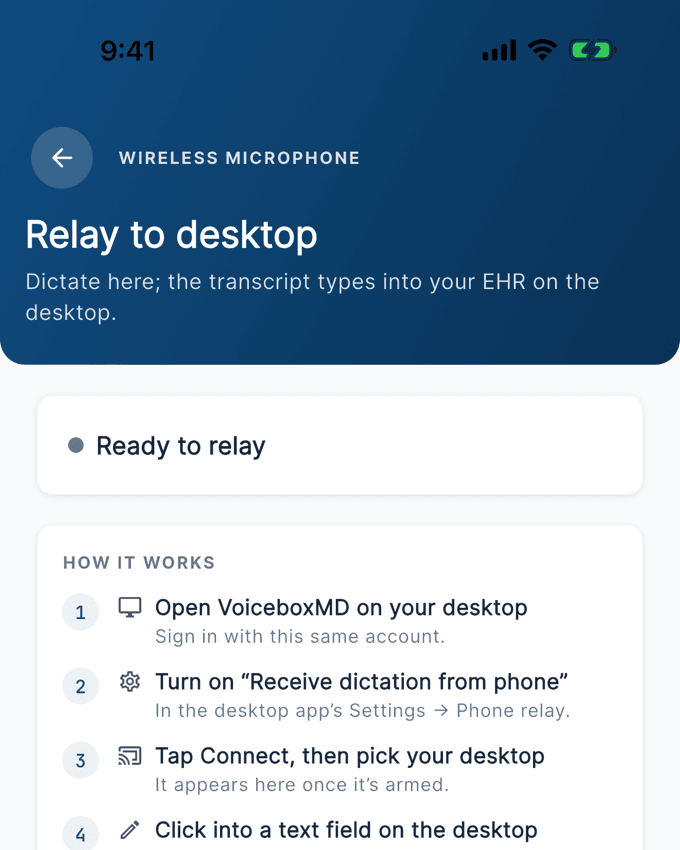
Dictate clinical notes walking between exam rooms. The note is on your desktop when you sit down, one click from the open field in your EHR.
- DictateOn your phone, between rooms, hands free.
- ReviewThe draft waits on your desktop, structured to your template.
- InsertIt types into the open field. Epic, Cerner, Athena, anything with a cursor.
What changed for physicians who use VoiceboxMD
“My charts are always completed by the end of clinic, and I get to spend time with my family in the evenings instead of typing notes.”
“Helping us work smarter, not just harder. My whole office loves it.”
“What I find most impressive is the recognition and proper spelling of medical terms and medications.”
Serious clinical infrastructure, doing its job quietly
Built for medical speechAI-powered medical dictation on a medical speech model, with 26 specialty settings and custom vocabulary for the terms you use.
HIPAA, end to endHIPAA-compliant medical transcription. TLS 1.3 in transit, AES-256 at rest, BAA included.
Every EHRThe desktop app places text at your cursor in any EHR field.
Your audio stays yoursAudio is deleted automatically within 7 days, with a record of each deletion. No patient data goes to analytics.
Frequently asked questions
Everything physicians and IT teams ask before switching. Straight answers.
What is VoiceboxMD and how does the medical dictation software work?
VoiceboxMD is cloud-based medical dictation and ambient AI scribe software for clinicians. Speak naturally into a microphone on your computer or phone. In the desktop app, the text is pasted at the cursor in EHR systems such as Epic, Cerner, athenahealth, eClinicalWorks and Practice Fusion. Recognition uses a medical speech model, plus custom vocabulary for the terms you use. It also includes a Clinical Notepad for structured SOAP and H&P notes, customizable macros and templates, and sync between mobile and desktop.
Which EHR systems does VoiceboxMD integrate with?
VoiceboxMD is EHR-agnostic. It works with any EHR that accepts keyboard input, including Epic, Cerner, athenahealth, eClinicalWorks, Practice Fusion, Kareo, NextGen, AdvancedMD, and DrChrono. The desktop app places dictated text directly into the active field, with no copy-paste on your part.
Does VoiceboxMD work on Mac, Windows, and mobile devices?
Yes. VoiceboxMD runs natively on Windows 10+, macOS 12 or later (Apple Silicon and Intel Macs), iOS 13 or later and Android, and there is a web app. Dictate patient notes on your iPhone between exam rooms, and transcribed notes sync automatically to your Mac or PC workstation. All data is encrypted and HIPAA-compliant across every device.
Does VoiceboxMD work in Citrix, VMware, and remote desktop environments?
VoiceboxMD pastes text at the cursor of whatever window has focus. Inside a Citrix, VMware or Remote Desktop session, that works only if the remote client passes the paste through, so test it in your own environment during the trial.
What microphone do I need for medical dictation?
VoiceboxMD supports built-in laptop microphones, USB headsets, and professional-grade desktop microphones. Most modern built-in microphones work well for daily clinical use. For noisy clinic environments, a USB noise-cancelling headset is recommended for best accuracy. The iOS app uses your iPhone microphone. Recommended options: https://voiceboxmd.com/ehr-emr-dictation/supported-microphones/.
How accurate is VoiceboxMD with medical terminology and drug names?
VoiceboxMD uses a medical speech model built for clinical English, so drug names, anatomical terms, procedures and clinical abbreviations are recognized out of the box. Add your practice's own terms, such as names, local drugs and abbreviations, to custom vocabulary so they are recognized too. Your specialty setting adds a starter set of terms for your field.
Does VoiceboxMD work well with accents or non-native English speakers?
VoiceboxMD's speech recognition handles a wide range of English accents. It does not adapt to your individual voice over time, so if a word keeps coming out wrong, add it to your custom vocabulary. The free trial is the best way to test it with your own voice.
What medical specialties does VoiceboxMD support?
VoiceboxMD has 26 specialty settings, including primary care and family medicine, cardiology, pulmonology, psychiatry, orthopedics, dermatology, gastroenterology, neurology, OB/GYN, endocrinology, nephrology, ENT, radiology, surgery, pediatrics, dental, chiropractic, veterinary, prosthetics and orthotics, behavioral health and therapy, urology, oncology, ophthalmology, emergency medicine, and pain management. Your specialty setting adds a starter vocabulary for your field, and you can add custom terms for your practice.
Does VoiceboxMD offer ambient AI scribe capabilities?
Yes. VoiceboxMD offers both traditional medical dictation and an ambient AI scribe. The scribe listens to the visit through your device's microphone, then generates a structured SOAP or H&P note, or a note in your own template. Every plan from $49/mo includes the ambient AI scribe in the Windows, Mac, iOS, Android and web apps; Power ($79/mo) adds ICD-10 and CPT code suggestions, pre-recorded audio upload in the web app, and the letters and summaries around the visit.
How much documentation time can I realistically save each day?
It depends on how you chart today, so measure it on your own clinic days during the free trial. Published research on ambient AI scribes gives a guide: at The Permanente Medical Group, 7,260 physicians used AI scribes in about 2.5 million visits in the first year, and the time saved in notes was estimated at 15,791 hours (Tierney et al., NEJM Catalyst, 2025). At Mass General Brigham, the share of clinicians reporting burnout fell from 50.6% to 29.4% after 42 days with an ambient scribe (You et al., JAMA Network Open, 2025). These are results for AI scribes in general, not measurements of VoiceboxMD.
How much does VoiceboxMD medical dictation cost?
Three plans are available: Essential at $49/mo (the ambient AI scribe with no monthly note cap, plus real-time dictation with a medical vocabulary, macros and templates), Power at $79/mo (adds ICD-10 and CPT code suggestions, referral and prior-auth letters, after-visit summaries and pre-recorded audio upload), and Premium at $99/mo (adds a writing style learned from your own edits). Annual billing saves up to 8%. All plans include a free trial, no setup fees, HIPAA compliance with BAA, and live support. Cancel anytime. Compare plans: https://voiceboxmd.com/pricing/.
Is VoiceboxMD a good alternative to Dragon Medical One?
Yes. VoiceboxMD publishes its price, from $49/mo, billed monthly or annually; Microsoft does not publish Dragon prices, and Dragon is sold through Microsoft and its resellers. VoiceboxMD runs natively on Mac and Windows, includes mobile dictation with desktop sync, AI-powered SOAP generation, and HIPAA compliance with BAA at no extra cost. Setup is typically under 5 minutes with minimal IT overhead.
Is VoiceboxMD HIPAA-compliant and secure?
Yes. VoiceboxMD is HIPAA-compliant across desktop, mobile, and web. Voice data and transcribed text are encrypted in transit with TLS 1.3 and at rest with AES-256. Audio files are deleted automatically within 7 days. A Business Associate Agreement (BAA) is included with every subscription at no additional cost, and role-based access controls restrict PHI access to authorized users.
Is my patient audio used to train VoiceboxMD's AI models?
No. VoiceboxMD does not use patient audio or transcribed text to train its AI models. Audio files are deleted automatically within 7 days. Clinical data is not shared with third parties for model training and is retained only as needed to deliver the service.
Can I try VoiceboxMD before committing?
Yes. Monthly plans include a 7-day free trial of the plan you choose. Annual plans include a 14-day free trial. A card is collected at checkout and is not charged during the trial. No setup fees, no contracts, cancel anytime. Start your free trial: https://voiceboxmd.com/try/.
Does VoiceboxMD work for emails, Word documents, and admin tasks?
Absolutely. Beyond clinical notes, VoiceboxMD works with applications that accept keyboard input, including Microsoft Word, Outlook, Google Docs, and other desktop productivity tools. Dictate emails, referral letters, correspondence, and administrative documents hands-free.
Ready to get your evenings back?
Try it on your next clinic day. Free 7-day trial, no setup fees, cancel anytime.
Start free trial