
Medical Dictation Software for Mac
A medical speech model, HIPAA-compliant, and running on your Mac in under 3 minutes. Developed from the outset with the needs of clinicians in mind.

Purpose-built for doctors. Works equally great on Windows.
Medical Dictation for Mac & iOS
Real-Time Medical Dictation on Mac
Speak naturally. See your clinical notes appear instantly, formatted, punctuated, and medically accurate. VoiceboxMD's medical dictation software for Mac transcribes in real-time directly into your EHR or Notepad. No lag. No buffering.
Upload Audio Files & Get Notes in Minutes
Recorded a patient encounter on your iPhone? Upload the audio file to VoiceboxMD on your Mac and get a fully transcribed, AI-formatted clinical note in minutes, complete with SOAP structure and ready to paste into your EHR.
Finish Charts Before You Leave
Dictate into the open field between patients, or let the ambient scribe draft the note while you talk. The goal is simple: every chart done before you leave the office, not after dinner.
HIPAA-Compliant & Enterprise-Grade Secure
VoiceboxMD for Mac encrypts all voice data with AES-256 at rest and TLS 1.3 in transit. Audio is deleted automatically within 7 days. Business Associate Agreements (BAA) are included at no additional cost for every subscriber.
Setup in 3 Minutes. No IT Required.
Download. Install. Dictate. VoiceboxMD runs on macOS 12 or later and supports both Apple Silicon (M1, M2, M3, M4) and Intel Macs. No server configuration, no IT tickets, no marketplace approvals.
A Medical Vocabulary, Plus Yours.
Apple dictation doesn't know 'metformin' from 'methotrexate.' VoiceboxMD uses a medical speech model built for drug names, anatomical terms and procedures, and 26 specialty settings add starter terms. Add your own names and terms to custom vocabulary.
iPhone to Mac Sync, Dictate Anywhere
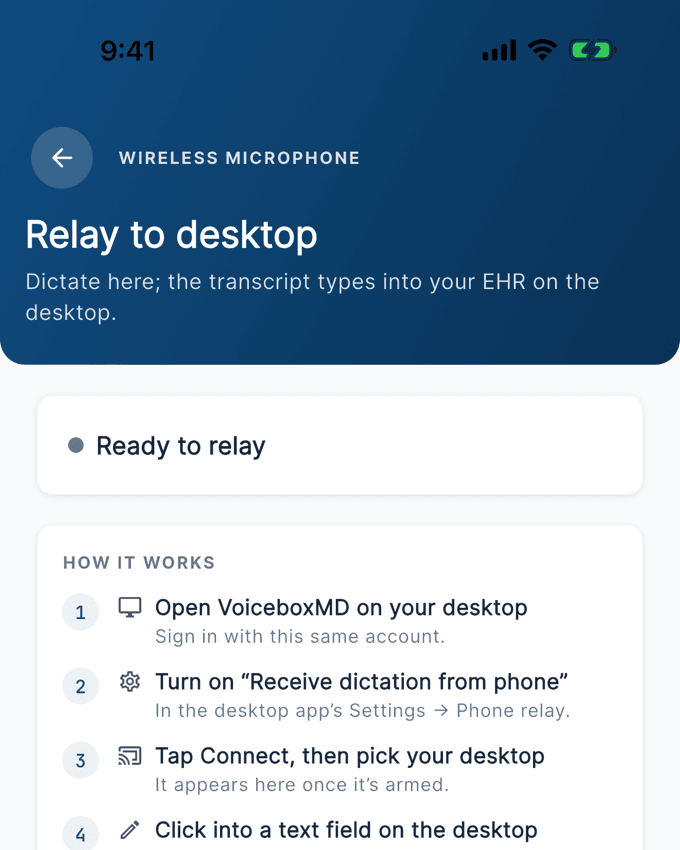
Dictate a patient note on your iPhone walking between exam rooms. By the time you sit down at your Mac workstation, the note is transcribed, AI-formatted, and waiting for you. Copy into your EHR in one click.
Works with Every EHR on Mac
Epic. Athena Health. Practice Fusion. Cerner. eClinicalWorks. Kareo. NextGen. Allscripts. VoiceboxMD is EHR-agnostic, it works with all of them on your Mac. Place your cursor in any EHR text field, activate VoiceboxMD, and dictate.
The Math Is Simple
$49/month for medical dictation and the ambient AI scribe on your Mac. That’s roughly $1.60 per day. Microsoft does not publish a Dragon Medical One price to compare against. Use the free trial to measure how much charting time it takes off your own clinic days.
Why Apple’s Built-In Dictation Fails for Medical Documentation
Most physicians try Apple’s built-in dictation first. It’s free. It’s convenient. And it fails spectacularly in clinical settings. Here’s why generic dictation tools don’t work for medical documentation, and what medical dictation software for Mac actually needs to do:
Apple Dictation
- Misspells drug names ("metformin" becomes "met for men")
- No medical vocabulary
- Not HIPAA compliant, audio sent to Apple servers
- No BAA available
- Can't format SOAP notes or clinical structures
- No EHR-specific optimization
- No mobile-to-desktop sync for clinical notes
- No macros, templates, or voice commands
VoiceboxMD for Mac
- Medical speech model for clinical terminology
- Custom vocabulary for drugs, names and local terms
- Fully HIPAA compliant with AES-256 encryption
- BAA included for every subscriber
- AI formats SOAP notes, H&P, ROS automatically
- Works with Epic, Athena, Practice Fusion & all EHRs
- iPhone-to-Mac sync, dictate on the go
- Custom macros, templates, voice commands
How Medical Dictation on Mac Works: 4 Steps, 3 Minutes
No IT department. No server configuration. No marketplace approvals.
Download
Download VoiceboxMD for Mac. Runs on macOS 12 or later, Apple Silicon (M1-M4) and Intel. Install in under 2 minutes.
Open Your EHR
Open Epic, Athena, Practice Fusion, or any EHR on your Mac. Click into the documentation field.
Dictate
Click the mic or press your hotkey. Speak naturally. Your clinical notes appear in real-time.
Review & Sign
Quick review, save, done. Charts done before you leave the office.
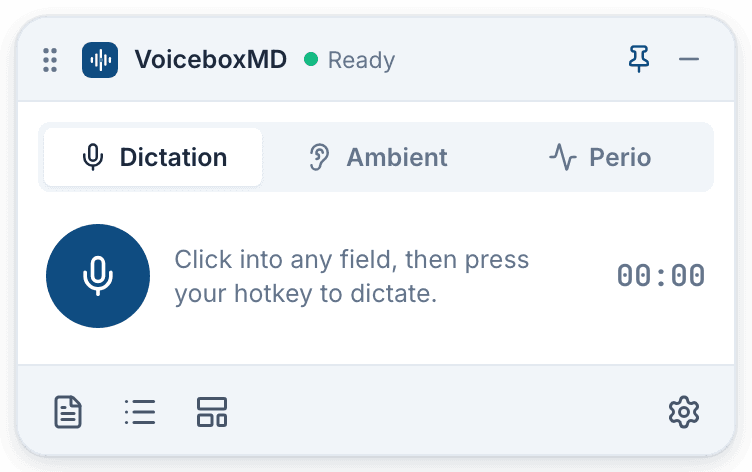
The whole app is this small floating widget. It sits over your EHR and stays out of the way.
Working on a PC? VoiceboxMD works equally great on Windows.
VoiceboxMD vs. Dragon Medical One on Mac, Side by Side
| Feature | VoiceboxMD | Dragon Medical One |
|---|---|---|
| Published Price | From $49/mo | Not published |
| macOS Support | Native | Cloud |
| Mobile Dictation + Sync | iPhone to Mac | Mobile app listed for Dragon Copilot |
| AI Medical Scribe | Included on every plan | Dragon Copilot, licensed separately |
| HIPAA + BAA | Included free | Not stated publicly |
| Self-Serve Free Trial | Yes | None listed |
| How You Buy | Online, monthly or annual | Microsoft agreement or a reseller |
The complete Dragon Medical alternative comparison covers every platform.
3 Plans. No Contracts. Cancel Anytime.
Essential
$49 /mo
Ambient AI scribe with no note cap, medical speech-to-text, custom medical vocabulary, macros & templates.
Start free trialPower
$79 /mo
Everything in Essential + ICD-10 and CPT code suggestions, referral and prior-auth letters, after-visit summaries, orders checklists, audio upload.
Start free trialPremium
$99 /mo
Everything in Power + notes that learn how you write, from your own edits.
Start free trialAnnual billing saves up to 8%. Free trial included: 7 days monthly, 14 days annual. See full pricing.
Mac + iPhone = Zero Charting After Hours
Dictate on iPhone between patients. Notes sync to your Mac, AI-formatted and ready. Currently available on iOS.
Who Uses Medical Dictation Software for Mac?
VoiceboxMD medical dictation software for Mac is used by physicians across every specialty and practice type. If you document patient encounters on a Mac, VoiceboxMD eliminates the typing bottleneck:
Primary Care & Family Medicine
High-volume practices where 15-minute visits leave zero time for typing. Dictate structured SOAP notes in real-time on your Mac and finish every chart before the next patient.
Specialists & Surgeons
Complex terminology across cardiology, orthopedics, psychiatry, radiology, dentistry, and more. Add the terms your specialty uses to custom vocabulary.
Solo Practices & Small Groups
No IT department? No problem. VoiceboxMD installs in minutes, costs $49/month, and scales from solo providers to multi-physician practices with shared templates and vocabulary.
Frequently Asked Questions: Medical Dictation Software for Mac
Have a question? Chat with our team.
What is the best medical dictation software for Mac in 2026?
VoiceboxMD is medical dictation software for Mac purpose-built for physicians. It uses a medical speech model with custom vocabulary, works natively on macOS 12 or later (both Apple Silicon and Intel Macs), integrates with all EHR systems on Mac including Epic, Athena Health, and Practice Fusion, and is fully HIPAA-compliant with BAA included. Plans start at $49/month with no contracts and a free trial.
Does VoiceboxMD work on Apple Silicon Macs (M1, M2, M3, M4)?
Yes. VoiceboxMD runs natively on all Apple Silicon Macs, M1, M2, M3, and M4 chips, as well as Intel-based Macs. The software requires macOS 12 (Monterey) or later and an internet connection. It's lightweight and cloud-based, so it runs efficiently without slowing down your Mac or competing with your EHR for system resources.
Can I dictate into Epic, Athena, and other EHRs on my Mac?
Yes. VoiceboxMD is EHR-agnostic and works with every EHR system accessible on Mac: Epic, Athena Health, Practice Fusion, Cerner, eClinicalWorks, Kareo, NextGen, Allscripts, and more. It uses intelligent cursor positioning to transcribe directly into any text field, progress notes, H&P, discharge summaries, Epic MyChart messages, any field that accepts text. No IT department involvement or marketplace installation required.
Is VoiceboxMD HIPAA compliant for clinical use on Mac?
Yes. VoiceboxMD is fully HIPAA-compliant with enterprise-grade security on all platforms including Mac. All voice data is encrypted in transit (TLS 1.3) and at rest (AES-256). Audio is deleted automatically within 7 days. Business Associate Agreements (BAA) are included for every subscriber at no additional cost. Your patients' protected health information is secured at every step.
Why is Apple's built-in dictation not enough for medical documentation?
Apple's built-in dictation was designed for consumer use, emails, texts, and casual notes. It lacks a medical vocabulary, consistently misspells drug names and clinical terminology, is not HIPAA-compliant (audio is processed on Apple servers without BAA), and cannot format clinical note structures like SOAP notes. VoiceboxMD's medical dictation software for Mac uses a medical speech model with custom vocabulary, is fully HIPAA-compliant, and automatically formats clinical documentation for your workflow.
How does VoiceboxMD for Mac compare to Dragon Medical One?
VoiceboxMD publishes its price: plans start at $49/month ($588/year). Microsoft does not publish Dragon prices; Dragon is sold through Microsoft and its resellers. VoiceboxMD includes iPhone-to-Mac sync, the AI Medical Scribe for automated SOAP notes on every plan (Microsoft's ambient scribe is Dragon Copilot, licensed separately), and HIPAA compliance with a BAA at no additional cost. Setup takes 3 minutes on Mac. No annual contract required, cancel anytime.
Can I dictate on my iPhone and sync notes to my Mac?
Yes. VoiceboxMD includes a dedicated iOS app that syncs seamlessly with your Mac. Dictate patient notes on your iPhone walking between exam rooms, during rounds, or on house calls. By the time you sit down at your Mac, the transcribed and AI-formatted notes are waiting, ready to review and paste into your EHR in one click. All data is encrypted in transit and at rest.
Does VoiceboxMD support templates, macros, and custom vocabulary on Mac?
Yes. VoiceboxMD on Mac includes custom templates, phrases, and voice-activated macros so clinicians can instantly insert common note structures, review-of-systems text, and counseling language with a few spoken commands. You can add practice-specific terminology, clinic names, referring physician names, and frequently used phrases to your personal medical vocabulary, all of which sync across your Mac, iPhone, and iPad.
What system requirements does VoiceboxMD need on Mac?
VoiceboxMD is lightweight and cloud-based. It requires macOS 12 (Monterey) or later, works on both Apple Silicon (M1, M2, M3, M4) and Intel Macs, needs 4 GB RAM minimum, a microphone (built-in or external), and an internet connection. The application uses minimal system resources and runs alongside your EHR without performance issues.
Is VoiceboxMD suitable for solo practices and group practices on Mac?
Yes. VoiceboxMD's cloud-based medical dictation platform scales from solo clinicians to multi-provider group practices. Flexible deployment, simple onboarding (no IT required), and cross-device access (Mac, Windows, iOS, Android and web) make it easy to standardize medical dictation across distributed teams. It works for in-office documentation and for charting from home. The ambient scribe records through your microphone, so it does not capture call audio from video visits.
Stop typing. Start dictating. Try VoiceboxMD on your Mac today.
Free trial. No contracts. Charts done before you leave the office.
Start free trial